
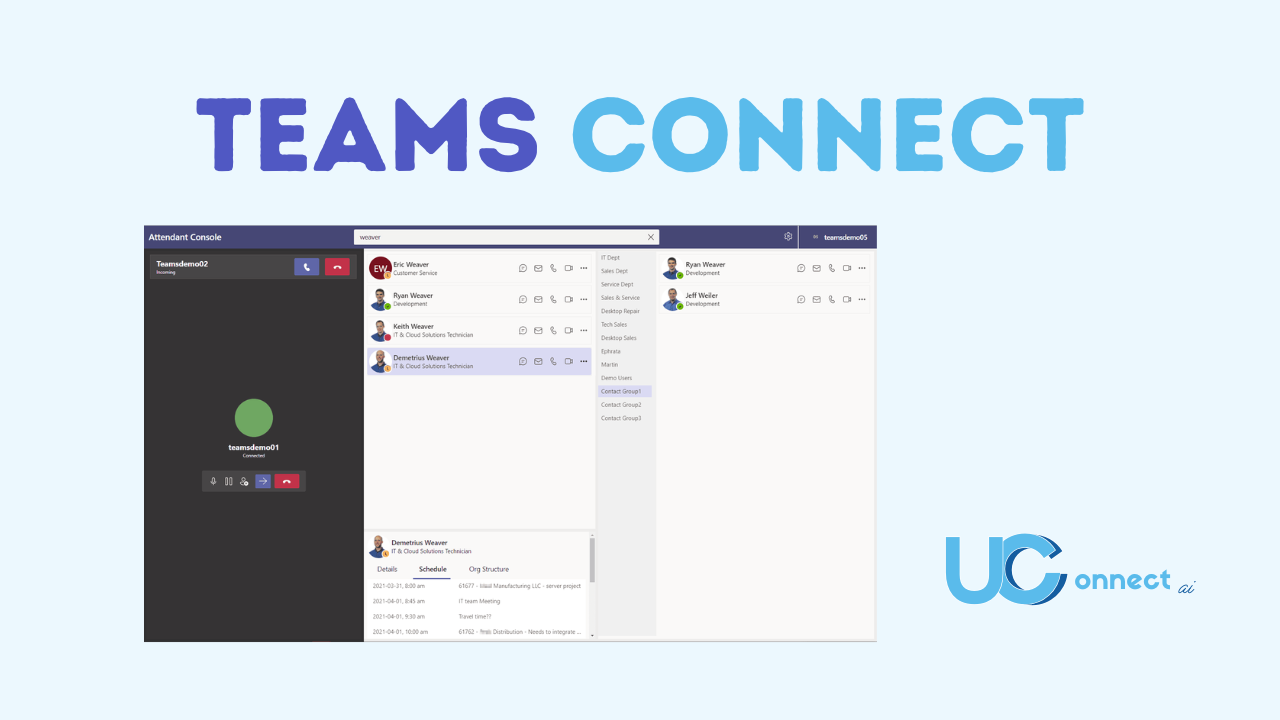
The way incoming calls are handled at the front desk—or by a receptionist, can set the tone for customer experience, internal efficiency, and overall professionalism. That’s where Teams Connect from UCC Networks coupled with the Landis Attendant Console for Microsoft Teams makes a real difference. Together, they bring powerful tools that simplify receptionist workflows, improve visibility, and make every call count.
What is Teams Connect?
Teams Connect is UCC Networks’ all-in-one voice and communications solution built on Microsoft Teams. Some of the standout features include:
- Flexible deployment via Operator Connect, Direct Routing, or a hybrid approach.
- Integration of SMS/MMS messaging, enabling users to text directly from Teams—useful for support, field-based teams, or even for reaching clients who prefer SMS.
- Built-in call recording, satisfying compliance, training, or quality-control needs.
- And crucially, a Receptionist Console option—streamlined call handling, one-click transfers, routing based on presence/status, etc.
“At UCC Networks, we believe that the front desk sets the tone for every customer interaction. With Teams Connect and Landis Attendant Console, we’re giving receptionists the tools to work smarter, connect faster, and ensure no call goes unanswered. It’s about turning the receptionist role into a strategic advantage for the entire organization.” – Oscar Reyes, Founder of UCC Networks
What is Landis Attendant Console?
Developed by Landis Technologies, the Attendant Console for Microsoft Teams acts much like a virtual switchboard specifically designed for receptionist users. It augments Teams so receptionists (or console operators) can handle incoming calls efficiently without juggling multiple tools. Key strengths include:
- One-click call handling — transfer, hold, mute, voicemail, etc. All accessible easily.
- Visibility into presence & calendar of Teams users so the receptionist can see who is available, who’s busy, when someone is free again.
- Multiple transfer types: safe transfer (if the intended party doesn’t pick up), consult (chat or audio consult before transferring), etc.
- Configurable layout, contact groups, quick-access shortcuts, keyboard shortcuts—it’s built for speed.
- Ability to manage multiple calls at once in a “single pane of glass” UI, reducing context switching and improving response times.
“At UCC Networks, we believe that the front desk sets the tone for every customer interaction. With Teams Connect and Landis Attendant Console, we’re giving receptionists the tools to work smarter, connect faster, and ensure no call goes unanswered. It’s about turning the receptionist role into a strategic advantage for the entire organization.” – Oscar Reyes, Founder of UCC Networks.”
Key Features in Action
- Presence & Calendar Integration
Know immediately who is free, busy, “in a meeting,” or away—so callers are never transferred blindly.
- Multiple Transfer Options
Safe transfer (automatically reverts if no answer), add participant, consult before transfer, direct to voicemail—all with minimal clicks.
- Callback Reminders & Missed Call Handling
If a call is missed, or needs follow up, you can set reminders, send callback messages, etc. Useful for reducing lost opportunities.
- Groups & Shortcuts
Favorite contacts, departmental groups, keyboard shortcuts—so frequent transfers are fast.
- Contact Center Queue Integration
If your organization is using call queues or a UCaaS / CCaaS setup, these can integrate so that receptionist console users see queue calls, wrap-up questions, etc.
Receptionist consoles are more than just a front-line tool—they’re a linchpin in how communications flow within an organization. Teams Connect provides the voice backbone, flexible deployment, and unified communications features. Landis Attendant Console enhances the experience for receptionists, giving them a powerful, easy to use UI to manage calls, transfers, presence, and more.
Contact Us for more information, visit www.ucconnect.ai or email hello@ucconnect.ai.
About UCC Networks
UC Connect is a UCC Networks product. UCC Networks is a leading service provider of unified communications and contact center solutions tailored for business, financial, government, healthcare, retail, and international industries.
